Watch & listen

Avid Mix and Avid Control Demo with Pro Tools 9 - Using Automation Controls Part 2

Also in this recording Avid Artist Control v2

The Artist Series from Avid (formally Euphonix Artist Series) are versatile audio control interfaces that are also extremely useful in other Pro Applications such as Logic, Final Cut Pro, and many more. The new Eucon... Read more

The Artist Series from Avid (formally Euphonix Artist Series) are versatile audio control interfaces that are also extremely useful in other Pro Applications such as Logic, Final Cut Pro, and many more. The new Eucon support has allowed for even more control with these incredible units. Luke Smith demonstrates how simple it is to write volume automation in Pro Tools 9 on this sample track by Rachelle Ferrell. To talk to a specialist today call SoundPure at 919.682.5552 or 888.528.9703 and learn how beneficial these audio interfaces can be in your studio!
Using Automation Controls in Pro Tools 9 With Avid's Artist Control and Mix Demo

Also in this recording Avid Artist Control v2

The Avid Artist Series are versatile audio interfaces that help create efficiency in many applications from Pro Tools to Final Cut Pro. The new Eucon Support allows users to have much more control and achieve better r... Read more

The Avid Artist Series are versatile audio interfaces that help create efficiency in many applications from Pro Tools to Final Cut Pro. The new Eucon Support allows users to have much more control and achieve better results than with the old HUI protocol. Luke Smith demonstrates a few new cool features that are available with the artist series (formally Euphonix control surfaces). To learn more, watch our other videos in this series, or call one of our expert engineers at SoundPure. 919.682.5552.

How to Control the Pro Tools Mixer Window Using the Avid Artist Series Tutorial

Also in this recording Avid Artist Control v2

Avid's Artist Mix and Control are versatile Control Surfaces for Pro Tools 9 and many other software applications. This demo by Luke Smith shows some new features of the Artist Series (formally Euphonix Artist Series)... Read more

Avid's Artist Mix and Control are versatile Control Surfaces for Pro Tools 9 and many other software applications. This demo by Luke Smith shows some new features of the Artist Series (formally Euphonix Artist Series) and the new possibilities with new Eucon support. This tutorial demonstrates how to control reverb on a bus send on Rachelle Ferrell's vocal track. Watch our other videos in this series to learn how to control plugins, customize the jog wheel, and much more. Call SoundPure today if you are interested in learning more about Avid's control surfaces. 919.682.5552

Avid Artist Mix and Control Tutorial - How to Control the Pro Tools Mixer

Also in this recording Avid Artist Control v2

Customize Artist Control Series for Pro Tools 9, with this video tutorial, Luke Smith of Avid discusses and demonstrates how the control the mixer on a session. Avid's Artist Control, Mix, and Transport (formally the... Read more

Customize Artist Control Series for Pro Tools 9, with this video tutorial, Luke Smith of Avid discusses and demonstrates how the control the mixer on a session. Avid's Artist Control, Mix, and Transport (formally the Euphonix Control Series) are highly customizable control surfaces for applications such as Logic, Final Cut, iTunes, Davinci Resolve, Pro Tools, and much more. Learn more through SoundPure and Avid's video series on the new features of these incredible units. For more information Call SoundPure today!

How to Program the Jog Wheel on Avid Artist Mix and Control

Also in this recording Avid Artist Control v2

Avid's Artist Mix and Artist Control, (formally the Euphonix Control Series) are highly customizable control surfaces for applications such as Pro Tools, Logic, Final Cut, Davinci Resolve, iTunes, and much much more.... Read more

Avid's Artist Mix and Artist Control, (formally the Euphonix Control Series) are highly customizable control surfaces for applications such as Pro Tools, Logic, Final Cut, Davinci Resolve, iTunes, and much much more. Avid Applications Specialist Luke Smith demonstrates how to program the jog wheel on the Artist Control. In this demo, he shows the flexibility now available with the new Eucon support by creating a shortcut for changing the volume in iTunes. If you are looking for more demos on how to utilize your control surface in the most efficient way, check out our other videos in the Artist Series Demos. If you are interested in making your workflow more efficient, please contact the expert engineers at SoundPure for more information on these incredible control surfaces. Call us today at 919.682.5552 or 1.800.528.9703

How to Customize Soft Keys on Avid Artist Series Controllers (Artist Mix and Artist Control)

Also in this recording Avid Artist Control v2

Avid's Artist Series Control Surfaces are highly customizable control surfaces that help improve efficiency in audio tracking and mixing projects as well as any other application such as video editing, color correcting p... Read more

Avid's Artist Series Control Surfaces are highly customizable control surfaces that help improve efficiency in audio tracking and mixing projects as well as any other application such as video editing, color correcting programs, or even iTunes. Luke Smith demonstrates how to customize soft keys and the touch screen with Eucon Commands on the Artist Mix and Control v2 in this demonstration video. Check out SoundPure's other videos in this Eucon series to learn about the new features available, or learn some neat tricks to help speed up your workflow. Call the crew at SoundPure for more information on these fantastic devices from Avid. 919.682.5552.

Avid Artist Series Demo - How to Create Custom Layouts (Artist Control/Artist Mix)

Also in this recording Avid Artist Control v2

Artist Mix and Artist Control Demos on how to create custom layouts using Avid's Pro Tools 9. Luke Smith demonstrates the ease and customizability of these control surfaces with the new Eucon support. The next demonstrat... Read more

Artist Mix and Artist Control Demos on how to create custom layouts using Avid's Pro Tools 9. Luke Smith demonstrates the ease and customizability of these control surfaces with the new Eucon support. The next demonstration in this Eucon demo series will show cool new features when customizing the soft keys. Stay tuned for more videos featuring these incredible control surfaces. Call Sound Pure today for more information 919.682.5552.

Avid Artist Mix and Control Pro Tools 9 with Eucon Support - Track Navigation Enhancements

Also in this recording Avid Artist Control v2

Avid Applications Specialist Luke Smith demonstrates the new layout feature available on the Avid (Euphonix) Artist Series (Avid Artist Control and Avid Artist Mix) thanks to the new Eucon support. Luke shows how to setu... Read more

Avid Applications Specialist Luke Smith demonstrates the new layout feature available on the Avid (Euphonix) Artist Series (Avid Artist Control and Avid Artist Mix) thanks to the new Eucon support. Luke shows how to setup custom layouts for different types of Pro Tools 9 sessions. Thanks to the new Eucon support, track navigation has never been easier. Watch our other demonstration videos in this Avid video series for more tips and tricks with the Artist Mix and Control. If you are interested in these products, call one of our experts for more details on these incredible control surfaces. 919-682-5552

Avid EUCON Setup In ProTools 9 Demo - Euphonix Artist Series

Also in this recording Avid Artist Control v2

Luke Smith from Avid demonstrates on the Euphonix Artist Control and Artist Mix the new EUCON support in ProTools 9 and the setup process. EUCON is a high-speed ethernet protocol developed by Euphonix and Avid that allow... Read more

Luke Smith from Avid demonstrates on the Euphonix Artist Control and Artist Mix the new EUCON support in ProTools 9 and the setup process. EUCON is a high-speed ethernet protocol developed by Euphonix and Avid that allows the Artist Mix and Artist Control units to control faders, knobs, displays and more for any supported application. Contact Sound Pure by email or phone for more information on Avid's products.

Rachelle Ferrell Avid Tracking Session on HD Native System

Also in this recording Avid Artist Mix Avid Artist Control v2

Sound Pure's Euphonix video series with Avid's new Eucon support for Pro Tools 9 features a tracking session using the new HD Native System with new HD I/O in order to demonstrate the some new incredible features. Rachel... Read more

Sound Pure's Euphonix video series with Avid's new Eucon support for Pro Tools 9 features a tracking session using the new HD Native System with new HD I/O in order to demonstrate the some new incredible features. Rachelle Ferrell was recorded by Erik Zobler and Pro Tools Operator Brian Carter. Listen to a clip of the session and stay tuned for the rest of the video series that demonstrates how to use cool new features with the Euphonix Artist Mix and the Artist Control. If you have any questions, contact the experts at Sound Pure today!

EUCON Support For Avid ProTools 9 - Euphonix Artist Series Demo

Also in this recording Avid Artist Control v2

The Artist Control and Artist Mix consoles from Avid are two high-end professional consoles that offer extremely quick audio mixing speeds and great resolution perfect for use in any personal studio. The Artist Contro... Read more

The Artist Control and Artist Mix consoles from Avid are two high-end professional consoles that offer extremely quick audio mixing speeds and great resolution perfect for use in any personal studio. The Artist Control's compact design makes it usable in almost any personal studio environment. The Artist Control and Artist Mix are now compatible with both Mac and PC applications like ProTools, Final Cut, Logic, Scratch, Sonar, Da Vinci Resolve and more through the EuCon control protocol. The Artist Control allows you to easily and quickly switch between multiple applications and workstations and can be connected to Artist Mix units to create a larger and more advanced mixing control surface. EuCon is a high-speed ethernet protocol developed by Euphonix and Avid that allows the Artist Mix and Artist Control units to control faders, knobs, displays and more for any supported application. Call or email the experts here at Sound Pure for more information about this product or any other product featured in this video.

Euphonix MC Transport from Avid - Demo

Also in this recording Avid Artist Control v2

The Euphonix Artist Series MC Transport from Avid is a great, affordable way to use Euphonix control surfaces. It runs the same version software as the Euphonix MC Mix and the Euphonix MC Control. The MC Transport is ful... Read more

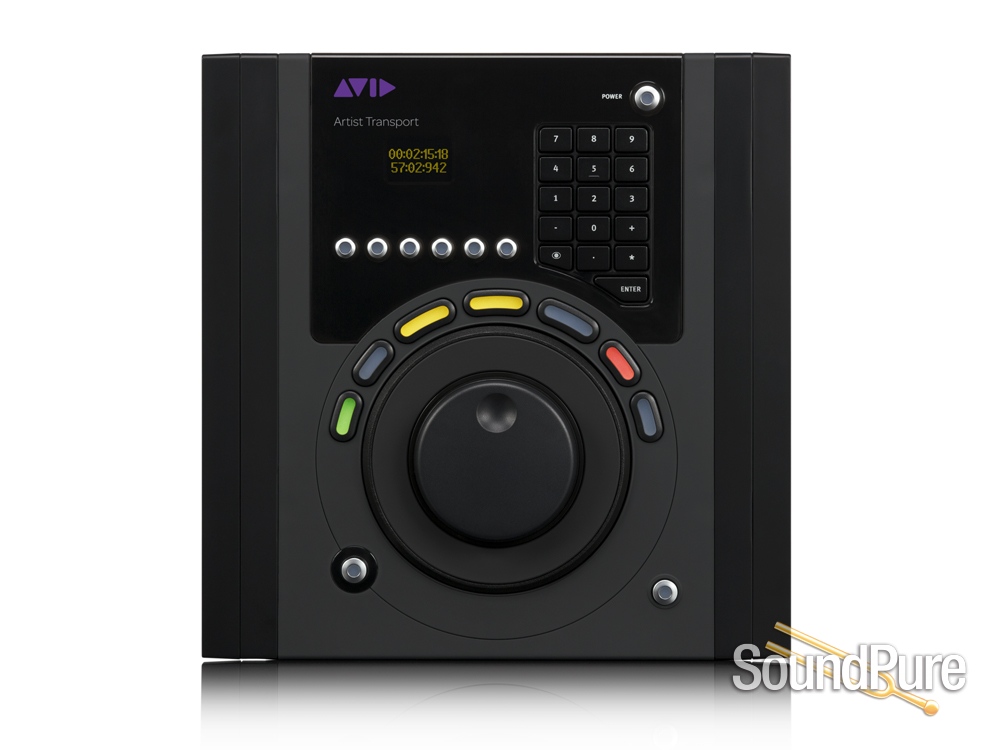
The Euphonix Artist Series MC Transport from Avid is a great, affordable way to use Euphonix control surfaces. It runs the same version software as the Euphonix MC Mix and the Euphonix MC Control. The MC Transport is fully customizable and gives you a complete graphical representation of every button on the Transport. The Transport has a jog and shuttle ring, numerical keypad, and soft keys to give you up to 44 customizable buttons for any application. The Euphonix MC Transport not only works wonderfully in Pro Tools, but also in any video editing program such as Final Cut, and any other DAW. Get your MC Transport today at Sound Pure! Call us or email us with any questions you may have.

From Avid

Instantly perform application functions, keystroke shortcuts, and macro commands using the six Soft Keys. Take a series of repetitive keyboard shortcuts that you use for editing and assign them to a single Soft Key.Assign various functions to the data wheel and shuttlering on the fly.

Using the integrated numeric keypad, you can instantly jump to time code or marker locations, as well as edit parameters by entering numbers. Like the transport controls, you can have all 16 numeric keys function as programmable Soft Keys when you use them with the Shift key. Press the Show Key on the numeric keypad to display the function of any Soft Key.

Play, rewind, fast forward, set markers, and more using the seven ergonomic keys set around the data wheel. You can view the status of each key through the multi-color LEDs, and easily program the functionality of each using the Soft Key editor. These controls automatically switch to match whatever application is in focus, and when used in conjunction with the Shift key, you get additional Soft Keys to program custom navigation and editing functions.

Because Artist Series controllers are modular, you can combine them in a variety of configurations to suit your workflow. Customize your Artist Series system with up to one Artist Control, four Artist Mixes, one Artist Transport, and one Artist Color for total flexibility—up to 36 faders total. Simply clip the units together to form a seamless surface—or use them separately—as each has its own Ethernet connection.

Dimensions
9 x 9.5 x 1.2 inches (22.9 x 24.1 x 3 cm)
Weight
2.6 lbs (2.5 kg)
Line voltage
100—240V AC
Frequency
50Hz to 60Hz

Free 3-Year Warranty

Sound Pure stands behind our products. Free three-year warranty on this item. Coverage exclusions live in Terms & Conditions, Section 27.

Level of support and expertise that simply isn't available at big-box megastores. Read the warranty →

Returns

Try Before You Buy: take it home, commit only when it's right. Program details →

Sound Pure Studios Control Room A — Durham, NC

Sound Pure Studios · Durham, NC

Come hear it in our control rooms.

Sound Pure is a working studio in Durham, NC — a 1,000 sq ft live room and two pro control rooms. Book a session to audition gear in a world-class acoustic space before you buy.